Here is my shell prompt for ksh:
PS1='\[\e[7m\]${?#0}\[\e[0m\]\W\$ '
(also works with bash & Busybox’s ash)
It looks like this: 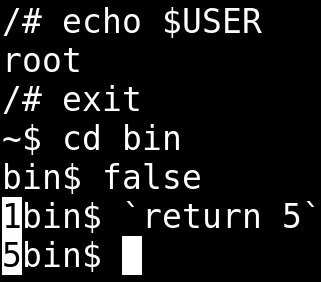
It’s nothing fancy, but I’m going to explain what each part of that ugly string does anyway.
Showing the Exit Status
An exit status of 0 means your command ran without a hitch, and
any other number is an error code. For some reason it is standard
to hide this info from the user. Sure, you could query the exit
status with echo $?, but that’d require you to have a premonition
of your command failing. On top of that, the $? variable gets
overwritten as soon as you run your next command.
Parameter Substitution
I use ${?#0} instead of just $? to keep out unnecessary
noise. This strips the
leading 0, leaving an empty string when everything goes right
while still displaying the exit status when it doesn’t.
The shell’s builtin substitutions
can help you avoid calls to external programs and subshells while
scripting. Here’s a simple example of parameter substitution compared
to plain old sed being used to strip the protocol from a URL:
~$ URL=http://example.net
~$ echo $URL | sed 's!^http://!!'
example.net
~$ echo ${URL#http://}
example.net
ANSI Escape Sequences
Before getting into the actual ANSI stuff, \[ and \] are there
to inform the shell that the enclosed characters will not actually
be displayed. Without these, the shell can get confused about line
wrapping and what not.
ANSI Escape Codes, on the other hand, get interpreted by the terminal
emulator as instructions for styling text. I use \e[7m to invert
the foreground and background colors when outputting the exit status
to make it pop out a bit. After that, \e[0m resets the terminal
to its default state.
Here’s a snippet that spews out all of the colors you can jam into your prompt:
i=0
while [ "$i" -le 255 ]; do
    printf "\e[48;5;%sm %3d \e[0m" "$i" "$i"
    i=$((i + 1))
done
printf "\n"
Despite the possibilities, I generally skip color in my terminal. The same goes for emojis, ligatures, and Nerd Fonts. :)
The Rest
\W shows just the current directory’s name. I like this more than
having the full path (\w). I saw a
script
that truncates directory names to keep your prompt short (e.g.,
~/.c/mpv). While it looks like a nice middle ground, including a
subshell in my prompt feels frivolous.
\$ displays $ for regular users and # for root. I don’t need
the username.
At the end of my prompt I like having a space. It gives a bit of breathing room between the prompt and the command.
Update
Since writing this I changed my prompt to just
PS1='${?#0} \W\$ ',
because I want to be able to type it from memory.