<?xml version="1.0" encoding="UTF-8"?>
<feed xmlns="http://www.w3.org/2005/Atom" xml:lang="en">
    <title>ongstad.net</title>
    <id>https://ongstad.net/</id>
    <link rel="self" href="https://ongstad.net/feed.xml" />
    <updated>2026-05-15T06:44:16Z</updated>
    <entry>
        <title>My ksh Prompt </title>
        <author><name>Ethan</name></author>
        <link href="https://ongstad.net/posts/my-shell-prompt"/>
        <id>https://ongstad.net/posts/my-shell-prompt</id>
        <updated>2026-05-14T00:00:00Z</updated>
        <content type="html">
        <![CDATA[
            <p>Here is my shell prompt for ksh:</p>
<pre><code>PS1=&#39;\[\e[7m\]${?#0}\[\e[0m\]\W\$ &#39;
</code></pre>
<p><em>(also works with bash &#38; Busybox&#8217;s ash)</em></p>
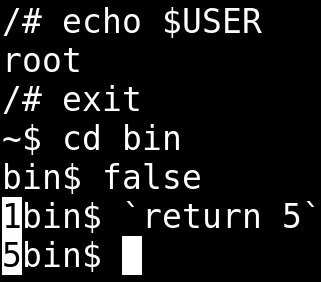
<p>It looks like this: <img src="/pics/prompt.webp" alt="demo of my prompt" /></p>
<p>It&#8217;s nothing fancy, I know, but I&#8217;m going to explain what each part
of that ugly string does anyway.</p>
<h2 id="showing-the-exit-status">Showing the Exit Status</h2>
<p>An exit status of <code>0</code> means your command ran without a hitch, and
any other number is an error code. For some reason it is standard
to hide this info from the user. Sure, you could query the exit
status with <code>echo $?</code>, but that&#8217;d require you to have a premonition
of your command failing. On top of that, the <code>$?</code> variable gets
overwritten as soon as you run your next command.</p>
<p>This inclusion might be the only unique thing about my prompt.</p>
<h2 id="parameter-substitution">Parameter Substitution</h2>
<p>I use <code>${?#0}</code> instead of just <code>$?</code> to avoid <a href="https://www.linfo.org/rule_of_silence.html">unnecessary
noise</a>. This strips the
leading <code>0</code> from the variable, leaving an empty string when everything
goes right while still displaying the exit status when it doesn&#8217;t.</p>
<p>The shell&#8217;s <a href="https://man.openbsd.org/ksh#Parameters">builtin substitutions</a>
can be used to avoid calls to external programs and subshells in
some scripts. Here&#8217;s a simple example of parameter substitution
compared to plain old <code>sed</code> being used to strip the protocol from
a URL:</p>
<pre><code>~$ URL=http:&#47;&#47;example.net
~$ echo $URL | sed &#39;s!^http:&#47;&#47;!!&#39;
example.net
~$ echo ${URL#http:&#47;&#47;}
example.net
</code></pre>
<h2 id="ansi-escape-sequences">ANSI Escape Sequences</h2>
<p>Before getting into the actual ANSI stuff, <code>\[</code> and <code>\]</code> are there
to inform the shell that the enclosed characters take up no physical
space on the screen. Without these, the shell will get confused
about line wrapping and cursor placement.</p>
<p>ANSI Escape Codes, on the other hand, are interpreted by the terminal
emulator as instructions for styling text. I use <code>\e[7m</code> to tell
the terminal to invert the foreground and background colors when
outputting the exit status to make it pop out a bit. After that, I
use <code>\e[0m</code> to reset the terminal to its default state.</p>
<p>Here&#8217;s a snippet that spews out all of the colors you can jam into
your prompt:</p>
<pre><code>i=0
while [ "$i" -le 255 ]; do
    printf "\e[48;5;%sm %3d \e[0m" "$i" "$i"
    i=$((i + 1))
done
printf "\n"
</code></pre>
<p>Despite the possibilities, I generally skip <a href="https://no-color.org">color in my
terminal</a>. The same goes for
<a href="https://www.unicode.org/L2/L2021/21055-esc-response-fdbk.pdf">emojis</a>,
ligatures, and <a href="https://www.nerdfonts.com/">Nerd Fonts</a>. :)</p>
<h2 id="the-rest">The Rest</h2>
<p><code>\W</code> provides the current directory name. I prefer this over having
the full path (<code>\w</code>). I saw a
<a href="https://git.sr.ht/~qbit/dotfiles/tree/master/item/bin/spwd">script</a>
that truncates directory names to keep your prompt short (e.g.,
<code>~&#47;.c&#47;mpv</code>). While it looks like a nice middle ground, including a
subshell in my prompt feels frivolous.</p>
<p><code>\$</code> displays <code>$</code> for regular users and <code>#</code> for root. In some odd
way, the root symbol could act as a safety against copy-pasting
commands since what follows is read as a comment. Is this a mere
coincidence, or divine providence offering a reckless soul the
opportunity to repent before ignorantly executing a command from a
forum as root?</p>
<p>Finally, I add a space at the end too. It gives a bit of breathing room
between the prompt and the command.</p>
<h2 id="additional-resources">Additional Resources</h2>
<ul>
<li><a href="https://man.openbsd.org/ksh#PS1">ksh man page on PS1</a></li>
<li><a href="https://git.sr.ht/~qbit/ohmyksh">ohmyksh</a></li>
<li><a href="https://jvns.ca/blog/2025/03/07/escape-code-standards/">More ANSI</a></li>
</ul>

        ]]>
        </content>
    </entry>
    <entry>
        <title>OpenBSD&#39;s DNS Firewall</title>
        <author><name>Ethan</name></author>
        <link href="https://ongstad.net/posts/openbsd-dns-firewall"/>
        <id>https://ongstad.net/posts/openbsd-dns-firewall</id>
        <updated>2026-03-06T00:00:00Z</updated>
        <content type="html">
        <![CDATA[
            <h2 id="why-not-pi-hole">Why not <a href="https://pi-hole.net/">Pi-hole</a>?</h2>
<p>Pi-hole needs no introduction; it has been a homelab staple for
years. However, this popularity has also gotten it into places where
it does not belong. If your goal is to self-host a recursive DNS
resolver with ad blocking, you&#8217;ll need to run Unbound too. Instead
of playing with cute web interfaces, we can simplify our networks
by leveraging Response Policy Zones (RPZ). On top of that, Pi-hole
only runs on Linux.</p>
<p>This isn&#8217;t for everyone; it requires familiarity with the command
line. My goal is just to show a better integrated alternative to
Pi-Hole for OpenBSD routers.</p>
<h2 id="configuring-unbound">Configuring Unbound</h2>
<p>Since Unbound is included in base, we do not need to install anything.
The configuration takes place in &#47;var&#47;unbound&#47;etc&#47;unbound.conf
because it runs in a chroot for extra separation.</p>
<p>Modify the config to something like:</p>
<pre><code>remote-control:
    control-enable: yes
    control-interface: &#47;var&#47;run&#47;unbound.sock

server:
    interface: 127.0.0.1
    interface: ::1

    hide-identity: yes
    hide-version: yes

    root-hints: "&#47;var&#47;unbound&#47;db&#47;named.cache"
    prefetch: yes

    auto-trust-anchor-file: "&#47;var&#47;unbound&#47;db&#47;root.key"
    prefetch-key: yes

    # The order of these matters!
    module-config: "respip validator iterator"

    define-tag: "ads nsfw"
    # You might want to change these to your subnets
    access-control-tag: 0.0.0.0&#47;0 "ads nsfw"
    access-control-tag: ::&#47;0 "ads nsfw"

rpz:
    name: oisd-ads
    url: https:&#47;&#47;small.oisd.nl&#47;rpz
    tags: "ads"

rpz:
    name: oisd-nsfw
    url: https:&#47;&#47;nsfw-small.oisd.nl&#47;rpz
    tags: "nsfw" 
</code></pre>
<p>I&#8217;m not going to break this down line by line. If you need help
understanding the config, start with the <a href="https://man.openbsd.org/unbound.conf">man
page</a>.</p>
<p>Validate the config with <code>unbound-checkconf</code>, because <code>rcctl
configtest unbound</code> doesn&#8217;t work for whatever reason.</p>
<h3 id="add-the-root-hints-to-the-chroot">Add the root hints to the chroot</h3>
<p>Recursive resolvers need to know where to start looking for DNS
records. The root hints file provides the IP addresses of the 13
authoritative root nameservers that anchor the global DNS hierarchy.</p>
<pre><code>cd &#47;var&#47;unbound&#47;db&#47;
ftp https:&#47;&#47;www.internic.net&#47;domain&#47;named.cache
</code></pre>
<h3 id="starting-unbound">Starting Unbound</h3>
<p>Enable the service and increase the startup timeout. Larger RPZ
files will increase the time it takes for the daemon to initialize,
so we tell rc that the wait is expected.</p>
<pre><code>rcctl set unbound timeout 60
rcctl enable unbound
rcctl start unbound
</code></pre>
<h3 id="redirect-all-dns-traffic-on-your-network-to-unbound">Redirect all DNS traffic on your network to Unbound</h3>
<p>Then add this little trick to <code>&#47;etc&#47;pf.conf</code> so that all incoming
local traffic on port 53 is routed to unbound. This doesn&#8217;t include
the router itself.</p>
<pre><code>pass in on !egress inet proto { udp tcp } from any to self \
    port domain rdr-to 127.0.0.1
pass in on !egress inet6 proto { udp tcp } from any to self \
    port domain rdr-to ::1
</code></pre>
<p>Now run <code>pfctl -f &#47;etc&#47;pf.conf</code> and you should be done!</p>
<p>Alternatively, you could advertise the resolver in
<a href="https://man.openbsd.org/dhcpd.conf">dhcpd.conf</a> and
<a href="https://man.openbsd.org/rad.conf">rad.conf</a> like a normal person.</p>
<h2 id="testing">Testing</h2>
<p>Modern web browsers often try to handle DNS internally (DoH), which
can make command-line tests deceiving. So I recommend web-based
tests to check if <a href="https://dnscheck.tools">DNSSEC</a> and the <a href="https://adblock.turtlecute.org">RPZ for
ad blocking</a> are working.</p>
<p>If these tests fail, check your browser&#8217;s &#8220;Secure DNS&#8221; settings;
it might be bypassing the system resolver.</p>
<h2 id="rpz-files">RPZ files</h2>
<p>If you have the available memory, I suggest using the big lists
from <a href="https://oisd.nl">OISD.nl</a>.  Another source I&#8217;ve found is
<a href="https://github.com/hagezi/dns-blocklists">hagezi&#47;dns-blocklists</a>.
Writing your own RPZ should also be self explanatory after you look
at the syntax of an already existing zone.</p>
<h2 id="additional-notes">Additional notes</h2>
<ul>
<li><a href="https://www.isc.org/docs/BIND_RPZ.pdf">BIND supports RPZ</a> too but I&#8217;ve never used it</li>
<li>If you want remote access take a look at <a href="https://man.openbsd.org/wg">wg</a></li>
<li><a href="https://www.youtube.com/watch?v=ZxTdEEuyxHU">YouTube video</a> of Paul Vixie explaining the current state of DNS</li>
<li>This article was inspired by <a href="https://btxx.org/posts/diy-home-network/">this guy</a> using Pi-hole</li>
<li>I found the pf trick on <a href="https://web.archive.org/web/20250216120141/https://flak.tedunangst.com/post/turn-your-network-inside-out-with-one-pfconf-trick">Tedu&#8217;s blog</a></li>
</ul>

        ]]>
        </content>
    </entry>
</feed>